Showing posts with label Blogger hacks. Show all posts

Sunday, May 6, 2007

Adding a bookmark button to blog

wondering if your blog visitor's are coming back to your blog?,Well they could be,but what if they forgot the url of your blog,this is where a bookmark button is gonna come in handy.

So here is how to make one
  • Go to Template tab
  • In the layout click on "Add a page element"
  • From the pop-up that appears select add Html/Javascript
  • Add this piece of code below in the popup that appears

For e.g mine looks like Bookmark
which opens the below window.

Saturday, May 5, 2007

Hide Navbar from blogger beta


A small tip on removing the Navbar from blogger beta,wondering what is a Navbar?,then see the picture below.Have you ever noticed something in my blog?,it dosen't have a Navbar from the day it was started,i removed it because it dosen't match the template of my blog,and it is really boring too.

So here is a few tips to remove it from your blog
  • Go to template tab
  • Go to edit html tab from template tab
  • Add this piece of code to your blog

    #navbar-iframe {
    height:0px;
    visibility:hidden;
    display:none;
    }
    or add this piece of code
    #navbar-iframe {
    display: none;
    }
Ok that is it,you are done,now you don't have to see the boring navbar on your blogwink

Saturday, April 28, 2007

Add google talk to blogger beta

make your blog readers feel at home with a google tak widget,now your readers can chat as well as read your blog at the same time..biggrin

Now you can add gtalk to your blogger beta blog just copy the following code and follow these steps
  • Go to template tab in your blogger beta blog
  • click on "Add a page element"
  • click on "add to blog" button of "Html/javascript" tab
  • Paste the code and click on save changes


tags:Adding gtalk to blogger beta

Friday, April 27, 2007

Add image header to blog


My blog image header

Blogger just added a new feature to it's template page and that is add header image option,i was about to write a trick on how to put a header image on blogger,and today as i was getting ready to write that,i simply checked my layout page and was surprised to see that google added the feature already,i am sure it wasn't there yesterday!,so here are a few tips on how to put your own header image on blog.

  • Go to template page>edit html
  • Click on expand widgets
  • From the html code find code like this

    #header {
    margin: 0;
    padding: 25px 60px 160px 160px;
    color: $pagetitlecolor;
    background: url(http://imageserver.com/bgnv2.jpg)
    no-repeat bottom left;
    }
  • Now from the above code copy the image url i.e(http://imageserver.com/bgnv2.jpg in this case copy and paste to address bar and save the image)
  • now open the image with photoshop or paint make your own header without changing the resolution of the image
  • Now save the image
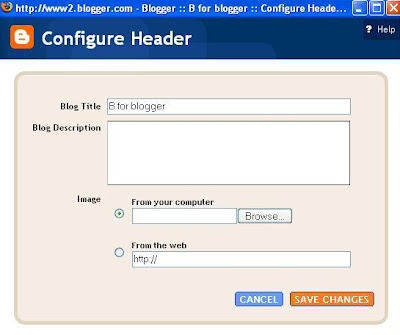
  • Go to template layout click on header edit button seen in picture
  • Now from the window that opens upload the header you made from computer
  • if you have already made a text in your header image then tick "instead of title and description" and if else you just have made the background then tick "behind title and description"
  • Save and publish
I am designing image headers,anyone interested in a free image header please comment.

Wednesday, April 25, 2007

Add emoticons for your blogger post's


Make your Blog post's look a bit more friendly by using emoticons , emoticons make your posts more friendly with your blog readers,this time i have came up with a blogger beta hack to put emoticons on your blogger post's,its really easy,believe mewink

first of all you gotta have the following

  • Mozilla firefox browser(if you don't have it yet you can get it from here)
  • after installing you have to install the greese monkey addon from hereclick on install when this tab appears
  • After that you have to install this script by clicking here
  • Now login to your blogger account to see emoticons in your create blog post's page

LinkWithin

Related Posts Plugin for WordPress, Blogger...